Vendor Management System for Ecommerce: Complete Guide
If you run or plan to launch a marketplace where several independent sellers share one storefront, you will hit an operational wall quickly. Someone has to approve sellers, check listings, route orders, calculate commissions, and send payouts. Spreadsheets and chat threads work for five vendors. They rarely work for fifty.
That is the problem a vendor management system for ecommerce is built to solve. This guide explains what it is, how it works, which features matter, and how to evaluate one before you commit. It is written for marketplace founders, ecommerce managers, and business owners who want a practical answer to one question: what kind of vendor management system do I actually need?
Quick answer: A vendor management system for ecommerce is software that lets a marketplace owner onboard, approve, monitor, and pay independent sellers from one central admin panel, while giving each seller a dashboard to manage their own products, orders, and earnings.
What Is a Vendor Management System for Ecommerce?
A vendor management system for ecommerce is the set of tools a marketplace uses to run its relationships with third-party sellers. It covers seller registration, product approval, order routing, commission calculation, payouts, and reporting. In most marketplaces, it is built into the multi-vendor ecommerce platform itself rather than sold as a separate product.
The name causes some confusion. In procurement, it usually means software a company uses to manage the suppliers it buys from. In a marketplace, the relationship runs the other way: independent sellers sell to your customers through your platform. This guide uses the marketplace meaning, also called vendor management software, a seller management system, or marketplace vendor management.
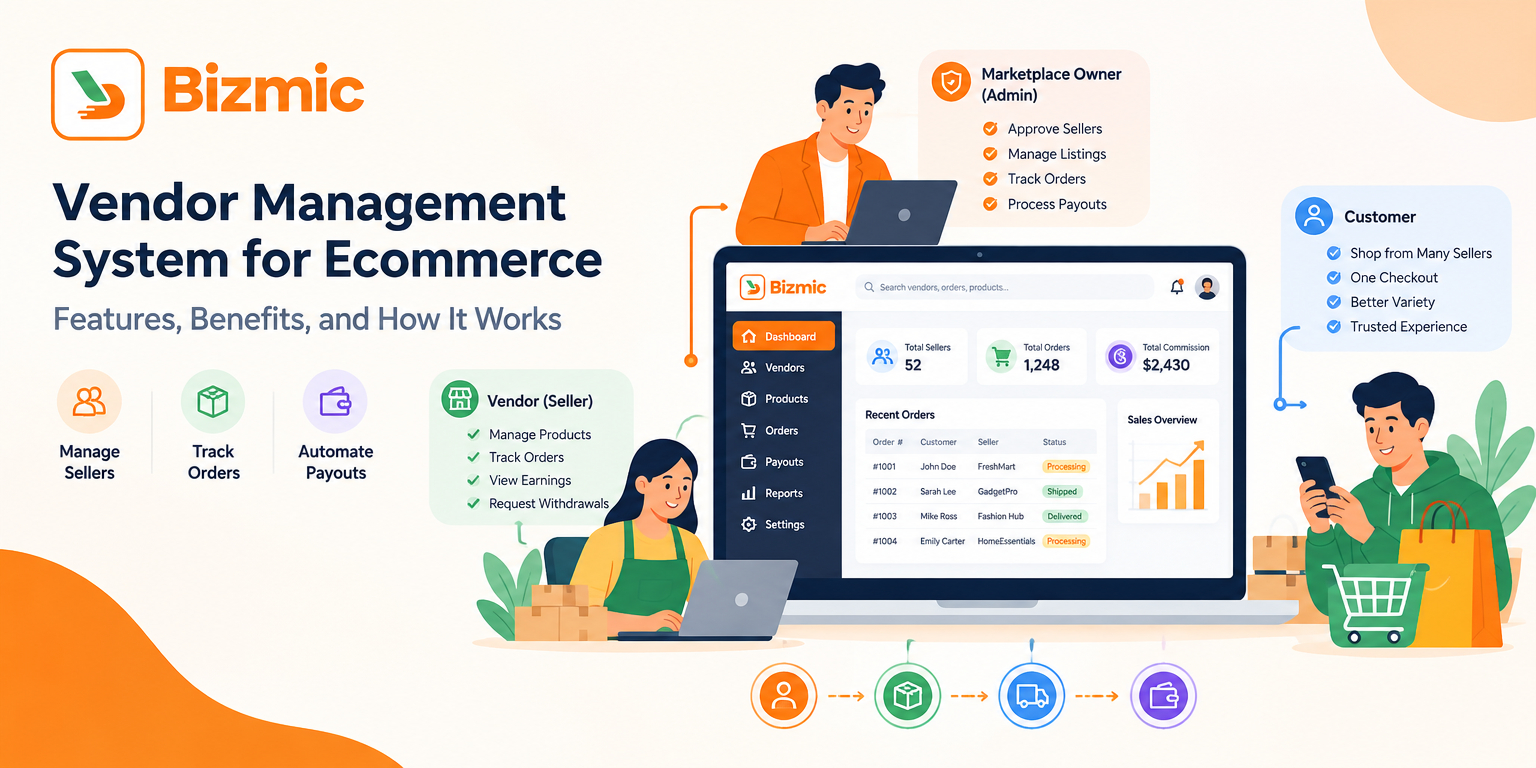
Three roles are involved:
- Marketplace owner (admin): sets the rules, approves sellers and listings, earns commission or subscription revenue, and stays accountable for the customer experience.
- Vendor (seller): lists products, manages stock, confirms orders, and tracks earnings.
- Customer: shops across many sellers in one storefront or app.
A single-store ecommerce platform is built around one merchant. A marketplace has to serve many merchants at once, each with their own catalog, orders, and balance. Shopify’s comparison of ecommerce platforms and marketplaces describes a marketplace as a site connecting many sellers with a broad base of buyers, and lists the fees marketplaces commonly charge sellers: listing fees, subscription fees, and transaction fees. Managing those sellers and fees is exactly what vendor management software handles.
How Does a Vendor Management System Work?
A vendor management system works by giving the marketplace owner an admin panel and each seller a separate panel, both connected to the same catalog, order, and payment data. Sellers list products and fulfill orders in their panel. The system records each sale, applies the commission rules, and tracks what the marketplace owes each seller.
In practice, the workflow usually follows these steps:
- A seller registers or is invited to join the marketplace.
- The admin reviews the seller and activates the store.
- The seller adds products, and the admin approves them if approval is required.
- A customer places an order, and the system routes it to the right seller.
- The seller confirms the order, prepares it, and hands it to delivery.
- The system calculates the marketplace commission and the seller’s earnings.
- The seller checks their balance and requests a withdrawal.
- The admin reviews reports, resolves issues, and processes payouts.
Here is a simple example. A customer buys milk from Store A and vegetables from Store B in one checkout. A vendor management system splits that into two sets of items, shows each store only its own, and records a separate commission and earning for each.
Why Ecommerce Marketplaces Need Vendor Management
A marketplace only works if sellers, customers, and the operator rely on the same information. Manual processes break that as the seller count grows.
What goes wrong without proper vendor management software
- Vendor onboarding becomes manual. Applications arrive by email, and someone copies details into a spreadsheet.
- Product approval becomes difficult. Without a review queue, low-quality listings go live and hurt customer trust.
- Seller orders are harder to track. Orders scattered across messages lead to missed or late fulfillment.
- Commission calculation gets complicated. Different rates, refunds, and discounts make manual math error-prone and cause disputes.
- Vendor payouts are hard to manage. Nobody is sure what each seller is owed, so payouts run late.
- Inventory visibility is fragmented. Customers order out-of-stock items because stock lives in each seller’s own system.
- Owners lose operational visibility. You cannot see sales, cancellations, or refunds in one place.
- Seller performance is hard to measure. Without data, you cannot reward strong sellers or act on weak ones.
A centralized system addresses each problem in the same way: information that used to live in scattered places is recorded once, in one system, and the same rules are applied every time.
Vendor Management System vs Traditional Ecommerce Management
Traditional ecommerce management assumes one business owns the catalog, takes the orders, and keeps the revenue. Marketplace vendor management assumes the opposite, and that changes what the software must do:
- Users: a single store has staff accounts. A marketplace adds many sellers, seller staff, and delivery personnel.
- Catalog: in a single store you own every product. In a marketplace, sellers own listings and you control quality.
- Money flow: a single store keeps the sale. A marketplace splits it between seller and platform, then pays sellers out.
- Orders: a marketplace order may contain items from several sellers that must be handled independently.
Bizmic draws the same line in its own product range: Retail Master is positioned for single-vendor, multi-branch ecommerce, while a multi-vendor ecommerce platform is the right category when independent sellers need their own panels. Pick the model first, then the software.
Essential Features of a Vendor Management System
Not every marketplace needs every feature on day one, but the areas below cover the full seller lifecycle. Use them as a checklist.
Vendor Onboarding and Approval
Vendor onboarding is how a seller joins the marketplace. A good system lets sellers register or be invited, lets the admin review and activate the account, and sets up a store profile. Approval matters because your reputation depends on who sells on your platform, so look for a review step before new sellers publish listings.
Seller Dashboard
The seller dashboard (also called a vendor panel or seller panel) is where each vendor works day to day. It should show new orders, listings, stock levels, and earnings, and expose only that seller’s data. A capable dashboard reduces support requests because sellers can answer routine questions themselves.
Product and Inventory Management
Sellers add and edit products in their own panel, while the owner controls catalog structure through categories and an approval step. Inventory visibility matters most here: without current stock counts, customers order items that are no longer available.
Order Management
Order management tracks each order from placement to delivery. In a marketplace this includes routing items to the right seller, letting the seller confirm the order, and giving the admin a full view. A fallback matters too: if a seller does not respond, the admin should be able to step in.
Commission Management
Commission is the share of each sale the marketplace keeps. The system should let you set rules, such as a global rate or different rates by store type, and apply them automatically. Payment tools built for marketplaces follow the same principle: Stripe’s marketplace documentation describes platforms keeping part of each transaction as a fee, and lists subscription fees as another way marketplaces earn revenue.
Subscription-Based Vendor Plans
Some marketplaces charge sellers a recurring plan instead of, or alongside, commission. The system handles plan tiers, seller sign-up, and store access tied to the plan, giving the owner steadier revenue and sellers a fixed cost.
Vendor Payouts and Withdrawals
The system should keep a running balance for each seller (sales minus commission and refunds), accept withdrawal requests, and let the admin review and process them. Note that the software records payouts, while the actual transfer depends on your payment gateway and banking setup. Stripe’s payout documentation shows one provider’s model, where funds accumulate in each connected account’s balance and the platform can schedule automatic payouts or run manual ones.
Vendor Performance Tracking
Performance tracking shows which sellers deserve more visibility and which need attention. Useful signals include order volume, cancellation and refund rates, fulfillment speed, and customer ratings. Depth varies: some platforms offer full seller scorecards, others give you reports and reviews to interpret yourself.
Roles and Permissions
Roles and permissions control who can see and change what. A marketplace needs at least three layers: admin staff (such as support or finance), seller owners, and seller staff. Granular permissions protect data like one seller’s sales figures and let you delegate without sharing full admin access.
Reports and Analytics
Expect marketplace-level reports on sales, revenue, commissions, and refunds, and seller-level views of each vendor’s own sales and earnings. Reliable reporting also makes commission disputes easier to settle.
Communication and Support
Sellers, customers, delivery staff, and the admin all need ways to reach each other. Common tools include live chat, support tickets, email templates, and push or SMS notifications. Centralizing them keeps a record of each issue.
Delivery and Fulfillment Coordination
If your marketplace handles delivery, as in grocery, food, and pharmacy, the system must coordinate sellers, drivers, and customers. That can include a delivery app, order tracking, and manual driver assignment. If sellers ship their own orders, you still need tracking and delivery confirmation in the order record.
Multi-Store and Zone Management
Multi-store support lets a seller manage several outlets from one account. Zone management defines where each store can deliver, which prevents promising delivery to areas you cannot serve.
Benefits of Using Vendor Management Software
- Less manual work: onboarding, approvals, and commission math run through defined workflows.
- Better accuracy: commissions and earnings follow rules, not hand calculation.
- Clearer visibility: the owner sees orders, revenue, and refunds across every seller.
- Stronger seller relationships: sellers get transparent balances and their own workspace.
- Easier scaling: adding the fiftieth vendor takes about the same effort as the fifth.
Manual Vendor Management vs Automated Vendor Management
| Area | Manual management | Vendor management system |
|---|---|---|
| Seller onboarding | Email, forms, and spreadsheets | Structured registration and admin review |
| Product approval | Ad hoc checks, often after listings go live | Review queue before or after publishing |
| Order tracking | Messages, calls, and shared sheets | One order dashboard with status updates |
| Commission | Calculated by hand per seller | Rules applied automatically |
| Payouts | Reconciled manually at month end | Running balances and withdrawal requests |
| Reporting | Assembled from several sources | Built-in sales and commission reports |
How to Choose a Vendor Management System for Ecommerce
The right choice depends on your business model, technical resources, and growth plans. These criteria help narrow the field:
- Business model fit: confirm it supports your revenue model (commission, subscription, or both) and your product category.
- Depth of the seller panel: sellers should manage products, orders, and stock without contacting you.
- Admin control: you should be able to approve listings, set commission rules, and step into orders.
- Payments and payouts: check supported payment gateways, currencies, and how withdrawals are handled.
- Delivery support: if you deliver, look for driver tools, tracking, and zone setup.
- Hosted or self-hosted: hosted software starts faster but ties you to a subscription. A self-hosted script gives you source-code ownership but needs hosting and setup.
- Customization and integrations: check how easily you can add modules or connect other systems.
- Documentation and support: good guides and support save time during launch.
- Total cost: compare license or subscription cost, hosting, setup, and payment fees.
Questions to Ask Before Choosing a Vendor Management Platform
- Can sellers register themselves, and can I approve them before they sell?
- Can I review products before they go live?
- How are commission rules set, and how do sellers request withdrawals?
- Do sellers manage separate products and orders without seeing each other’s data?
- What happens to an order if a seller does not respond?
- Is there a public demo, and who owns the source code and data?
Who Needs a Vendor Management System?
- Marketplace founders launching a multi-vendor store from scratch.
- Grocery, food, and pharmacy businesses running several partner shops under one app.
- Retailers moving from single-store to marketplace who want to add third-party sellers.
- Growing marketplaces whose spreadsheet processes are already slowing them down.
How Quick Ecommerce Supports Multi-Vendor Marketplace Management
Quick Ecommerce is Bizmic’s React-based multi-vendor marketplace solution. According to the official product page, it is sold as a complete script with source files, documentation, and installation packages through CodeCanyon. It includes an admin panel, seller panel, React user website, customer app, seller app, and deliveryman app. Its listed features map to the needs above:
- Vendor and store management: the admin panel manages vendors, products, orders, payments, and reports, while each seller works in their own panel.
- Product oversight: the admin can review, approve, edit, or remove any listed product.
- Commission and subscriptions: commission rules can be configured per store type, and a Subscription Module lets sellers launch stores under subscription plans.
- Withdrawals and wallet: withdrawal management covers store-wise seller and deliveryman requests, and a wallet module tracks balances.
- Orders and delivery: the store confirms each order, the admin can manually assign a deliveryman if no one responds, and zone setup defines delivery areas.
- Access, reporting, and support: roles and permissions cover admin, seller, and staff accounts, reports track sales, revenue, commissions, and refunds, and multiple payment gateways and multi-currency support are listed.
A few points are worth checking before you decide. Quick Ecommerce is a script you install on your own hosting, so setup is part of the project. Bizmic offers installation services and customization services for that, plus API integration for connecting payment gateways, ERP, or CRM systems. The product page also does not list dedicated seller scorecards, so if performance ranking is central to your model, test the reports in the demo first.
Conclusion
A marketplace is only as reliable as the way it manages its sellers. A vendor management system replaces scattered spreadsheets and messages with one workflow for onboarding, approvals, orders, commissions, and payouts. Define your business model first, then compare platforms against the features and questions above.
If you are looking for a ready multi-vendor solution, you can review the demo and feature list of Bizmic’s multi-vendor marketplace software and measure it against the checklist above.
Frequently Asked Questions
More Posts
- Readymade Marketplace Website in Bangladesh: Complete Guide
 Shiblur Rahman Lipu
 - Vendor Management System for Ecommerce: Complete Guide
 Shiblur Rahman Lipu
 - Best Multi-Vendor Ecommerce Script 2026: Comparison Guide
 Shiblur Rahman Lipu
 - Custom Ecommerce Website Price in BD: A Complete Cost Guide
 Shiblur Rahman Lipu
 - Ecommerce Website with bKash and Nagad Integration: Complete Guide for Bangladesh
 Shiblur Rahman Lipu
Stay Connected
for Newsletter

We build software that helps businesses launch faster, operate smarter, and grow bigger.


Get Help